STS
AWS Security Token Service (STS) provides temporary credentials for secure access to AWS resources, enabling least privilege and avoiding long-term credentials.
AWS Security Token Service (STS) is a managed web service that issues temporary, limited-privilege credentials for IAM users, IAM roles, or federated identities. By leveraging STS, you can enforce the principle of least privilege, avoid long-term credentials, and securely grant short-term access to AWS resources.
Use Case: External Application Access to Amazon S3
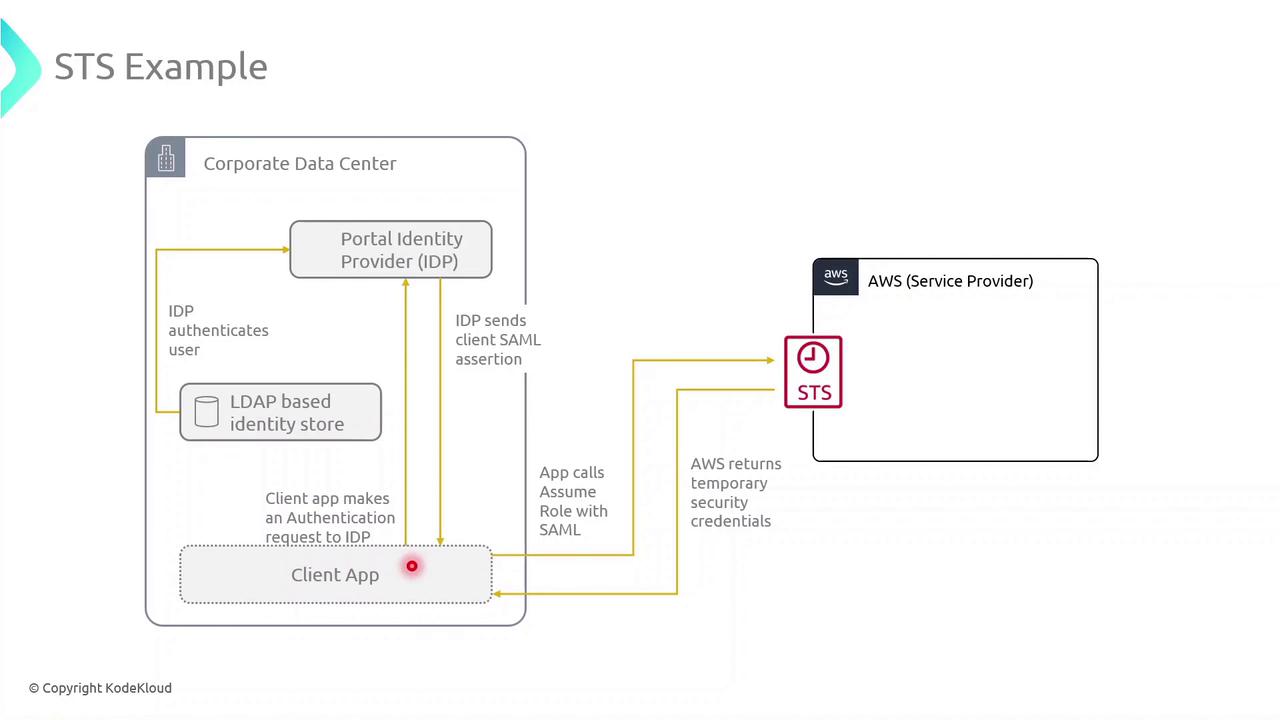
Consider an application running on-premises in your corporate data center. To retrieve objects from an S3 bucket without embedding long-term AWS keys, you can integrate STS with your identity provider (IdP) and SAML federation.
Step 1: Authenticate with Your Identity Provider
- The client application prompts the user for corporate credentials.
- These credentials are sent to an external LDAP-based IdP for verification.
- Upon successful login, the IdP issues a SAML assertion to the client.
Step 2: Call AssumeRoleWithSAML to Obtain Temporary Credentials
With the SAML assertion in hand, the application calls the STS endpoint:
```bash theme={null} aws sts assume-role-with-saml \ --role-arn arn:aws:iam::123456789012:role/S3AccessRole \ --principal-arn arn:aws:iam::123456789012:saml-provider/CorpIdP \ --saml-assertion file://assertion-response.xml
STS validates the SAML assertion, then returns these temporary credentials:
| Credential | Description |
| ----------------- | ----------------------------------------------- |
| Access Key ID | Unique identifier for the session |
| Secret Access Key | Secret used to sign AWS API requests |
| Session Token | Token that authorizes API calls for the session |
These credentials inherit the permissions defined in the assumed role’s policy and expire automatically (up to 12 hours).
<Frame>
</Frame>
### Step 3: Use the Temporary Credentials to Access S3
Export the returned credentials into your environment:
```bash theme={null}
export AWS_ACCESS_KEY_ID=ASIAXXXXXXXXXXXXXXXX
export AWS_SECRET_ACCESS_KEY=XXXXXXXXXXXXXXXXXXXXXXXXXXXX
export AWS_SESSION_TOKEN=XXXXXXXXXXXXXXXXXXXXXXXXXXXXXXXXXXXXXXXXXXXXXXXXXXXXXXXXXXXXXXXX
Now you can run S3 operations with least-privilege access:
bash  theme={null}
aws s3 ls s3://your-bucket-name/path/
References
Built with Mintlify.