Labels, Selectors and Annotations
This article explores labels, selectors, and annotations in Kubernetes for effective resource management and organization.
Welcome to this comprehensive guide on labels, selectors, and annotations in Kubernetes. In this article, we will explore how labels and selectors help group and filter items effectively, and we will also discuss how annotations are used to store additional metadata. By the end, you'll understand how these key concepts are applied to manage resources in a Kubernetes environment.
Introduction to Labels and Selectors
Labels and selectors offer a systematic approach to categorizing items. Think of a scenario where you have various species of animals, and you need to filter them based on attributes such as class, kind, or color. For example, you might want to filter for all green animals or just the green birds. By attaching labels like class, kind, and color to each animal, you can later use selectors to efficiently filter and display the items that meet your criteria.

In everyday applications, labels and selectors are ubiquitous. They function similarly to keywords in YouTube videos or blog posts, aiding users in finding relevant content. In online stores, labels empower customers to filter products based on various characteristics.
Labels and Selectors in Kubernetes
In Kubernetes, labels and selectors are instrumental in managing an array of objects such as Pods, Services, ReplicaSets, and Deployments. As the number of objects in a cluster grows, these tools become essential for grouping and selecting objects by application, functionality, or type.
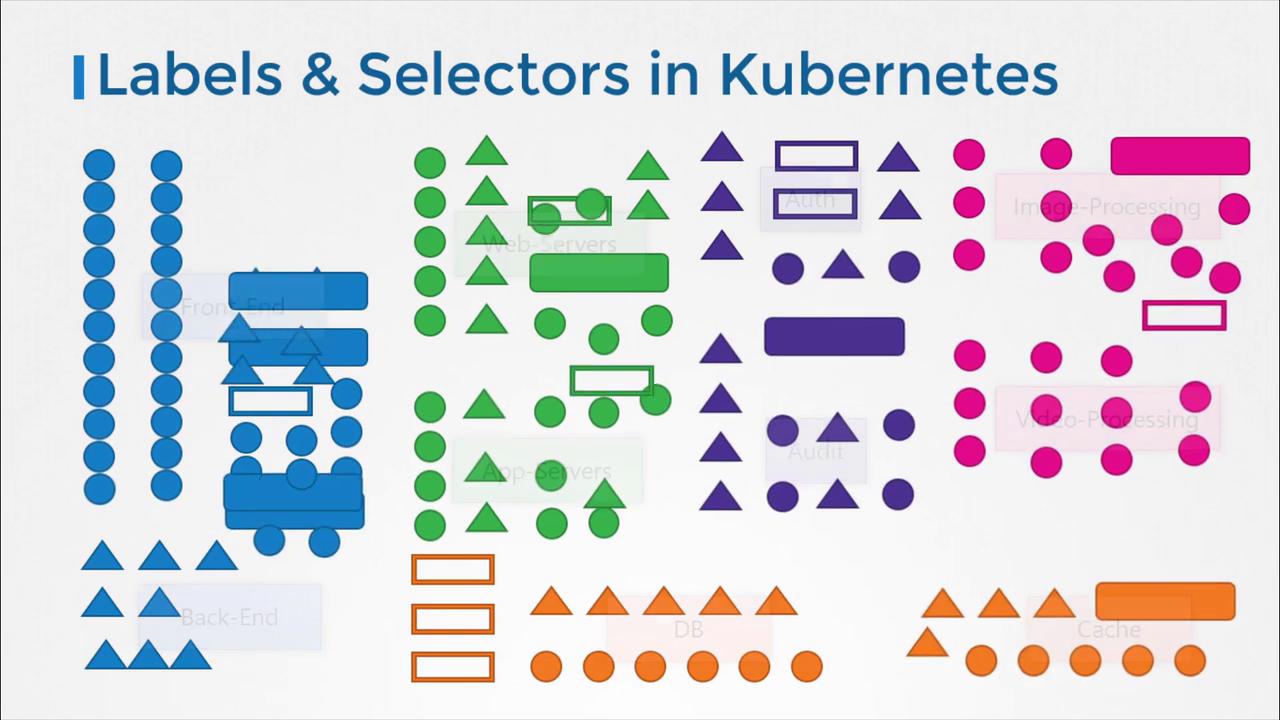
For instance, you might attach labels like "app" or "function" to your Kubernetes objects and later use selectors to filter objects based on specific conditions (e.g., app equals "App1").
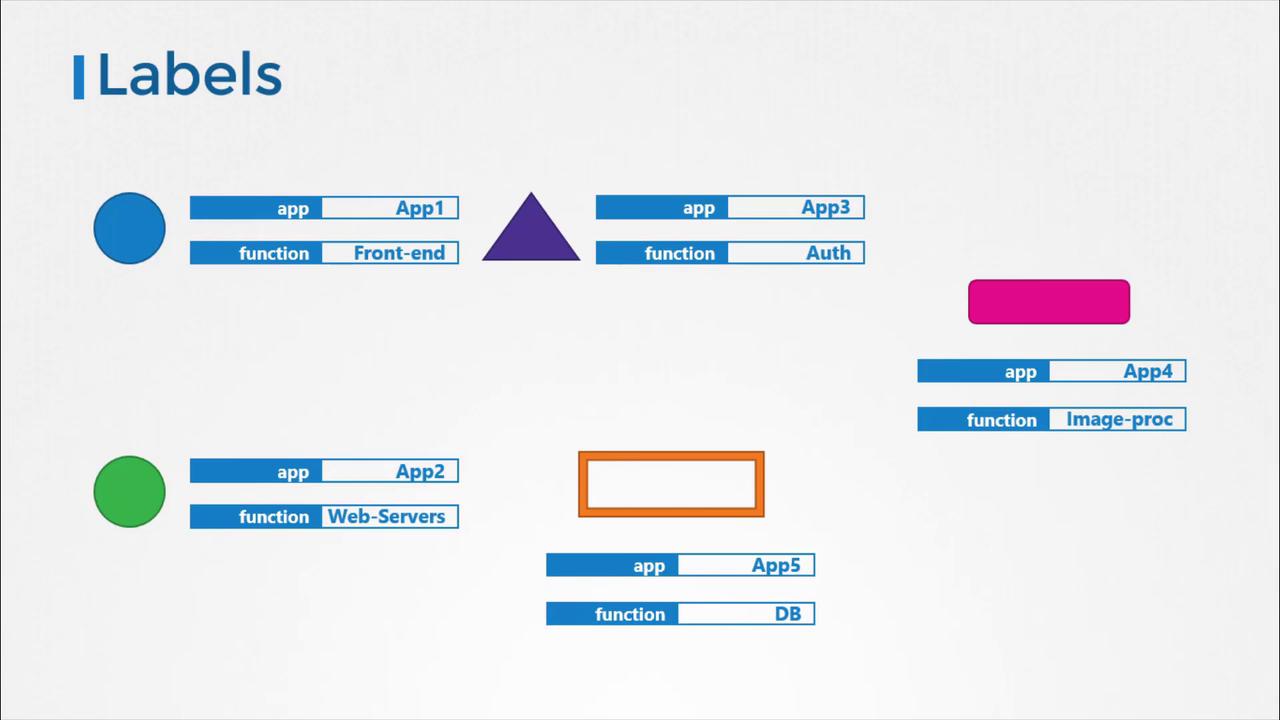
Specifying Labels in Kubernetes
To apply labels to a Kubernetes object such as a Pod, include a labels section under the metadata field in its definition file. Consider the following Pod definition example:
| pod.yaml | |
|---|---|
After creating the Pod, you can retrieve it using the kubectl get pods command with a selector. For example:
Note
Using selectors with kubectl commands helps you filter and manage resources in large clusters with ease.
Using Labels and Selectors with ReplicaSets
In Kubernetes, internal mechanisms utilize labels and selectors to connect different objects. When creating a ReplicaSet to manage three Pods, you first label the Pod definitions and then use a selector in the ReplicaSet definition to ensure the correct Pods are grouped together.
A ReplicaSet definition includes labels in two key areas:
- Within the ReplicaSet's metadata (allowing other objects to reference the ReplicaSet).
- Within the
templateof the ReplicaSet's specification (applying the labels to the Pods).
By setting the selector field in the ReplicaSet specification to match the labels defined on the Pods, you ensure that the ReplicaSet manages the intended Pods. Below is an example configuration:
| replicaSet.md | |
|---|---|
Note
If you require more granular control for selecting Pods, you can list multiple labels in the matchLabels section.
Annotations
Annotations differ from labels and selectors in that they are used to store additional metadata that is not intended for selection. This metadata might include details such as tool versions, build information, or contact information. Below is an example of a ReplicaSet configuration that includes an annotation:
apiVersion: apps/v1
kind: ReplicaSet
metadata:
  name: simple-webapp
  labels:
    app: App1
    function: Front-end
  annotations:
    buildversion: "1.34"
spec:
  replicas: 3
  selector:
    matchLabels:
      app: App1
  template:
    metadata:
      labels:
        app: App1
        function: Front-end
    spec:
      containers:
      - name: simple-webapp
        image: simple-webapp
When the ReplicaSet is created, it matches the Pods based on labels, ensuring that only the intended Pods are managed. The same mechanism is used when creating Services, where the Service's selector matches the labels set on the Pods.
Welcome to Kubernetes adventure series, In this blog I came up with a feature that often flies under the radar, yet holds substantial power in customizing and managing Kubernetes resources, is annotations. This blog post is designed to unravel the complexities of Kubernetes annotations, with a comprehensive understanding of their purpose, use cases, and best practices.
Understanding Kubernetes Annotations
Imagine you have a bunch of containers and services running in Kubernetes. You want to keep track of extra details about them, like notes or reminders, that don’t fit into their basic descriptions. That’s where annotations come in. They’re like labels but more detailed. You can use them to add all sorts of information to your Kubernetes objects that don’t directly affect how things run.
The Anatomy of Annotations
Annotations, like labels, are key-value pairs attached to Kubernetes objects. They are defined in the metadata section of object definitions, allowing you to store additional information that can be leveraged by tools and libraries working with these objects. Here is a simple example of an annotation within a Pod manifest:
apiVersion: v1
kind: Pod
metadata:
  name: example-pod
  annotations:
    example.com/log-level: "debug"
    example.com/update-policy: "auto"
spec:
  containers:
  - name: example-container
    image: nginx
In this example, two annotations are defined: example.com/log-level and example.com/update-policy. These annotations can be used to convey configuration information to utilities that process Pods but are not directly involved in their creation or management.
Why Use Annotations?
Annotations provide a mechanism for storing additional information about Kubernetes objects, enabling a variety of use cases:
- Storing build/release information: Annotations can hold information such as build/release IDs, PR numbers, git branch, docker image hashes, etc., that can be useful for debugging and tracing.
- Configuration and management: Tools and controllers can use annotations to manage and configure objects in a more flexible way than labels.
- Signaling between tools: Annotations can act as a signal between different tools controlling the same object, conveying information like whether an object should be auto-scaled, whether a service requires an external load balancer, etc.
Use Cases and Examples
Let’s explore some practical use cases where annotations can be particularly useful:
1. Tracking Deployment Information
Annotations are ideal for tracking information like deployment version, repository URL, or commit hashes. This can be invaluable for debugging purposes and understanding the provenance of deployed resources.
2. Signaling to Ingress Controllers
Ingress controllers can use annotations to customize behavior. For example, you might use an annotation to specify a custom rate limit or to enable client certificate authentication for a specific Ingress resource.
3. Configuring Pod Behavior
Annotations can influence the behavior of Pods or their containers. For instance, you could use annotations to specify a sidecar container should be injected into a Pod, with the annotation holding configuration data for the sidecar.
Best Practices for Using Annotations
While annotations offer great flexibility, it’s important to use them judiciously. Here are some best practices to keep in mind:
- Use domain-prefixed names: To avoid conflicts, use domain-prefixed names (e.g.,
example.com/my-annotation) for your annotations. - Keep them small: Annotations are not designed to hold large amounts of data. If you find yourself needing to store large blobs of information, consider using a ConfigMap or another storage mechanism.
- Document your annotations: Since annotations can be used freely, it’s crucial to document the annotations you use, their purposes, and their expected values. This is especially important for annotations used by tools and applications across your team or organization.
- Use them for non-identifying information: Remember, annotations are not meant to be used for identifying and selecting Kubernetes objects. Use labels for that purpose.
In conclusion, while Kubernetes labels might get the spotlight for their role in organizing and selecting resources, annotations work quietly in the background, offering a flexible mechanism for storing metadata, conveying configuration, and enabling integrations. By understanding and leveraging annotations wisely, you can unlock new possibilities for managing your Kubernetes resources more effectively and efficiently.
I'll help you sail through the ocean of Kubernetes with minimal efforts
Conclusion
This article has provided an in-depth look at labels, selectors, and annotations in Kubernetes. These concepts are essential for effectively managing and grouping objects within your clusters. For further hands-on practice, navigate to the coding exercises section and start working with labels and selectors today.